
Vị trí
Placement quyết định hộp nằm ở đâu và bám theo cái gì. Nó tách khỏi hộp thoại một cách có chủ ý: Classic Panel vẫn bám được NPC, và Speech Bubble vẫn ghim được vào góc màn hình.
Chỉnh ở đâu
Trong Conversations, hàng Defaults có menu placement:

| Lựa chọn | Kết quả |
|---|---|
| Use dialogue box placement | mặc định của hộp: panel ghim ở đáy màn hình, bong bóng bám theo NPC |
| Screen placement | ghim vào màn hình |
| Follow target | bám theo một nhân vật |
| Advanced placement properties… | mở Placement editor, ở dưới |
Một câu có thể nằm chỗ khác, ví dụ bong bóng trên đầu người chen ngang: chọn câu đó rồi dùng Placement → Customize placement trong tuỳ chọn của nó.
Hầu hết NPC không bao giờ cần tới phần này. Mặc định đã ổn.
Ghim vào màn hình
Trong Placement editor, đặt chế độ thành Screen.
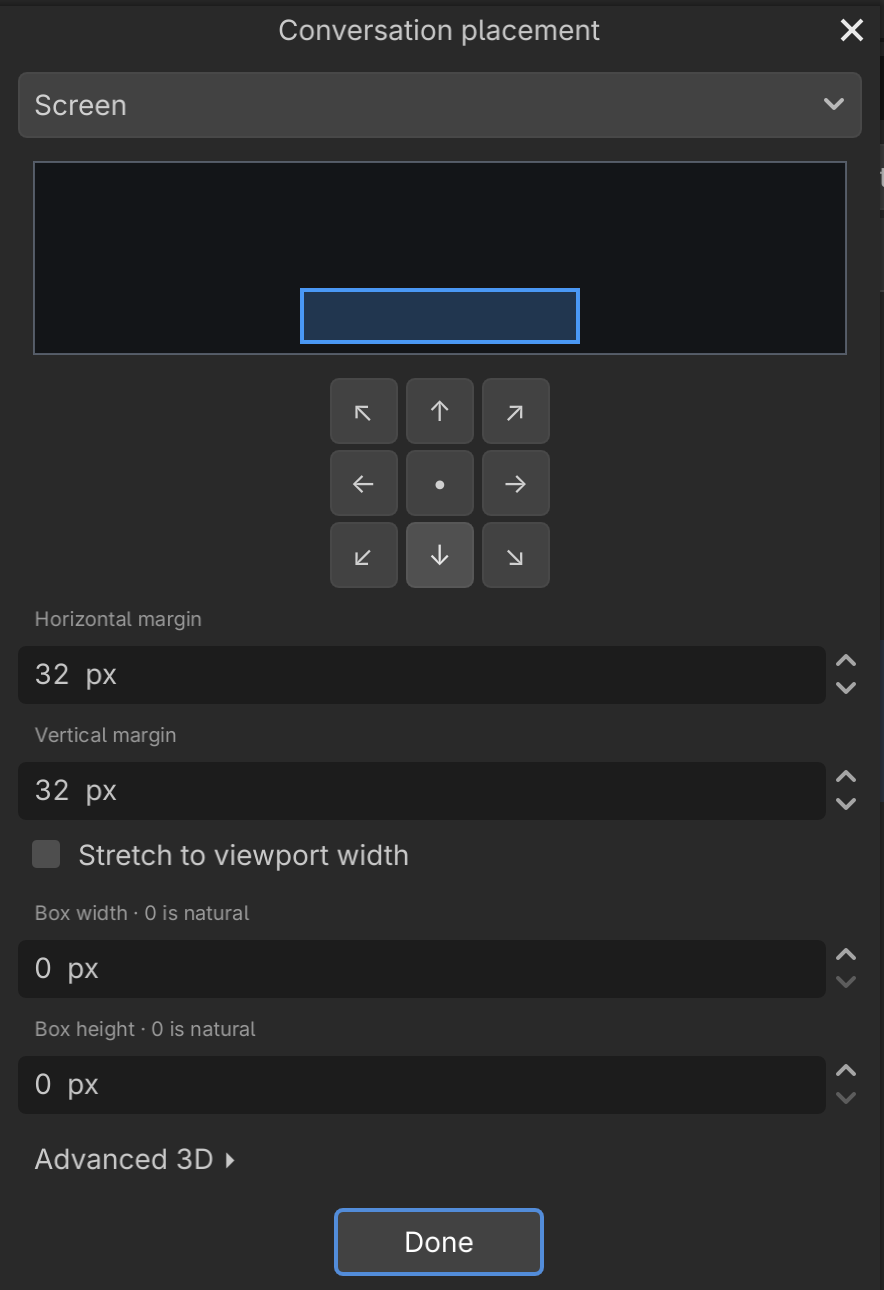
| Ô | Ý nghĩa |
|---|---|
| bản đồ 3×3 | hộp nằm ở góc, cạnh nào, hay chính giữa |
| Horizontal margin, Vertical margin | khoảng cách tới mép |
| Stretch to viewport width | trải hết chiều ngang màn hình, trừ lề |
| Box width, Box height | kích thước tối thiểu; 0 giữ kích thước tự nhiên |
Hộp luôn nằm gọn trong màn hình. Kích thước đặt sẵn là mức sàn: câu cần nhiều chỗ hơn thì hộp nới ra chứ không tràn. Không đặt chiều rộng thì chữ xuống dòng ở khoảng 440 px, không bao giờ rộng hơn màn hình, và tên người nói dài sẽ được rút gọn trước khi tràn khỏi hộp. Hoa văn, tên trên mép trên và đuôi bong bóng được tính là một phần của hộp, nên chúng cũng ở trong màn hình.
Bám theo nhân vật
Đặt chế độ thành Follow node.
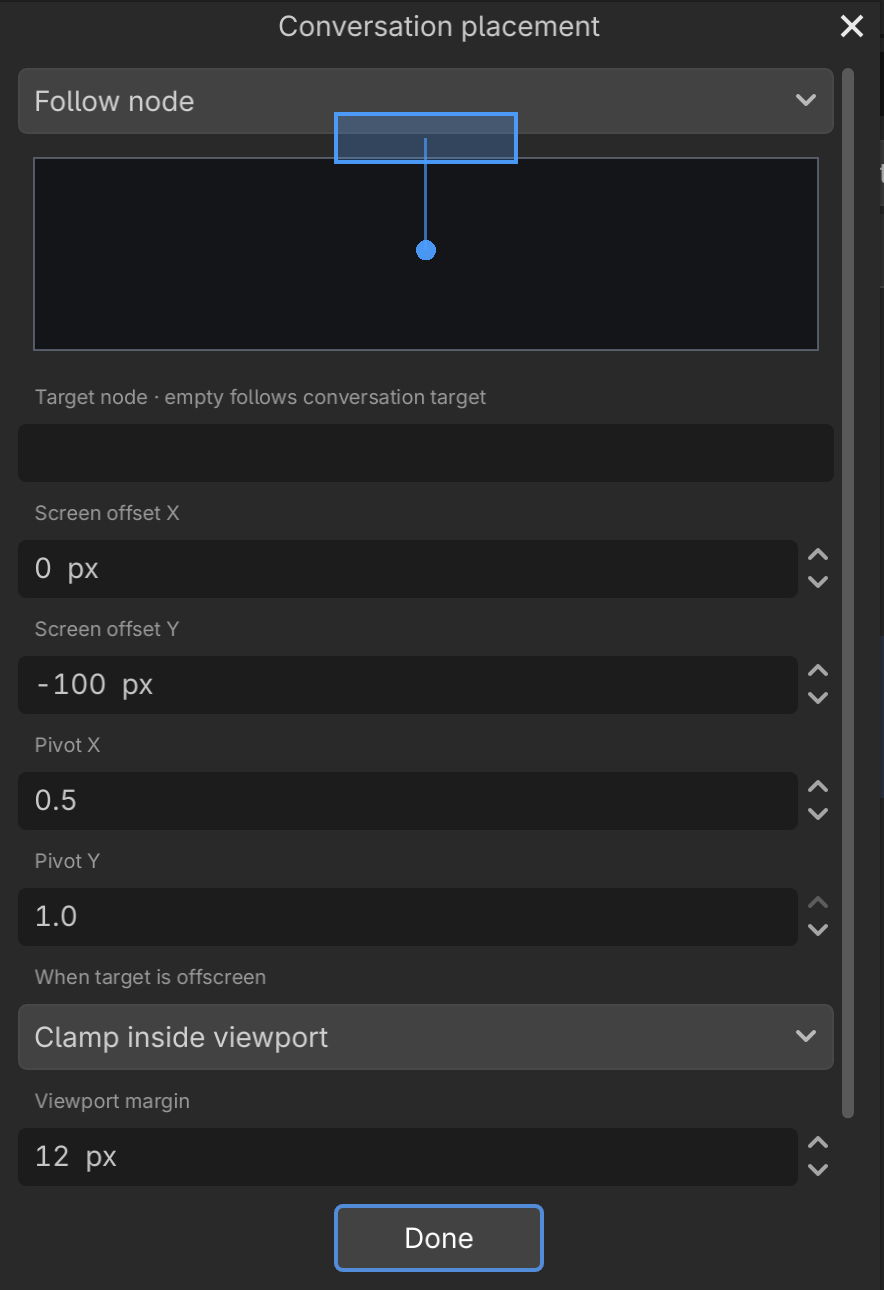
| Ô | Ý nghĩa |
|---|---|
| Target node | bám theo cái gì, là đường dẫn tính từ node NPCTalkKit. Để trống thì bám theo NPC chứa node |
| Screen offset X / Y | cách mục tiêu bao xa, tính bằng pixel; Y là -96 thì nằm trên mục tiêu 96 px |
| Pivot X / Y | phần nào của hộp đặt vào điểm đó |
| When target is offscreen | Clamp inside viewport, Hide when offscreen, hoặc Allow offscreen |
| Viewport margin | hộp bị kẹp được phép sát mép màn hình tới đâu |
Pivot thay cho "trên / dưới / trái / phải":
| Pivot X, Y | Kết quả |
|---|---|
0.5, 1 | phía trên mục tiêu |
0.5, 0 | phía dưới |
1, 0.5 | bên trái |
0, 0.5 | bên phải |
Clamp inside viewport là mặc định, vì một câu người chơi không đọc được còn tệ hơn một bong bóng lệch vị trí chút ít. Khi mép màn hình đẩy hộp đè lên người nói, nó chuyển sang phía bên kia và đuôi xoay theo.
Đường dẫn mục tiêu tính từ node NPCTalkKit, nên một placement lưu dùng chung vẫn chạy trên mọi NPC dựng giống nhau.
3D
Mọi thứ ở trên đều dùng được trong 3D: mục tiêu Node3D được chiếu qua Camera3D đang hoạt động. Mở Advanced 3D ▸ trong Placement editor cho những phần chỉ 3D cần:
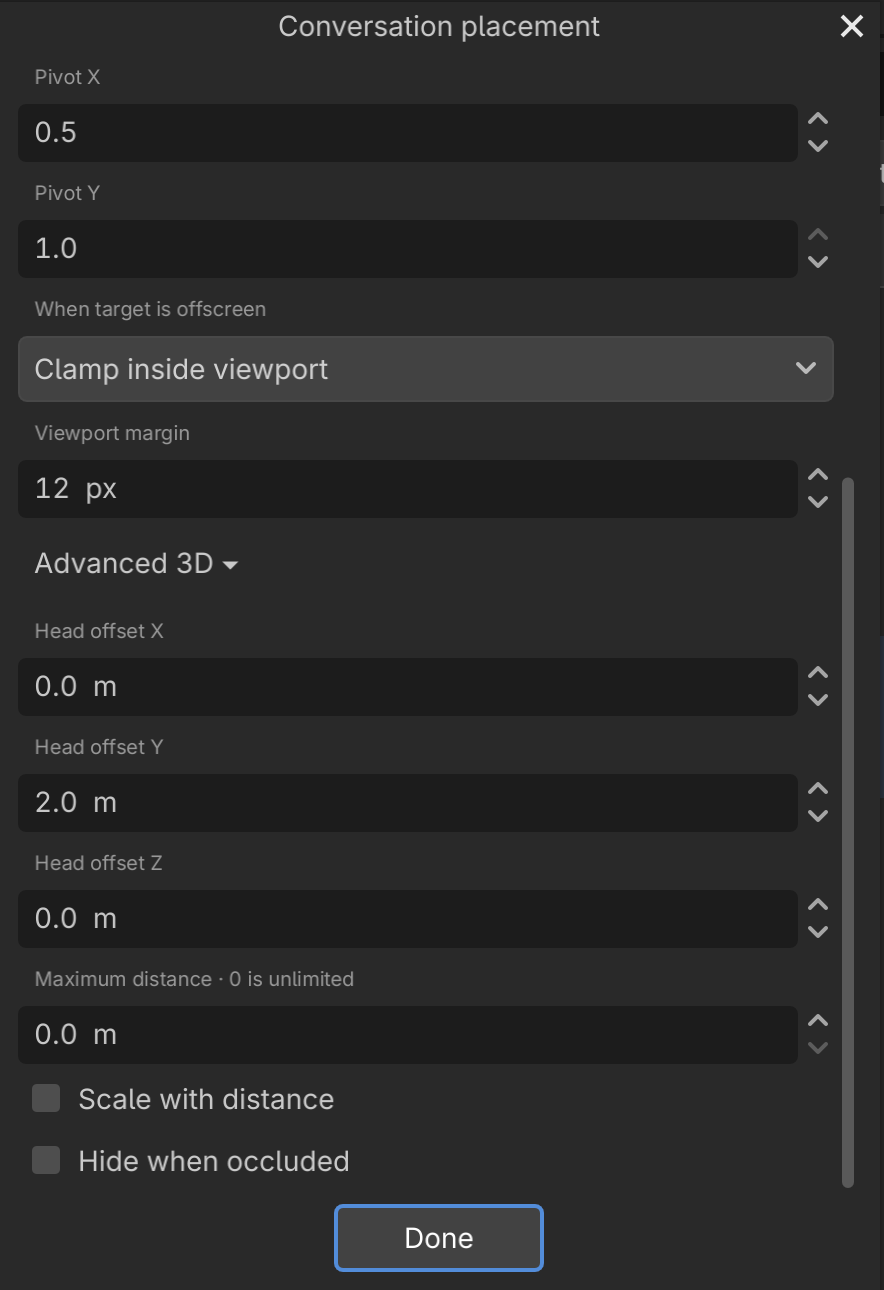
| Ô | Ý nghĩa |
|---|---|
| Head offset X / Y / Z | hộp chỉ vào chỗ nào trên nhân vật, tính bằng mét, ví dụ Y là 2 cho đỉnh đầu |
| Maximum distance | ẩn hộp khi nhân vật ở xa hơn; 0 là không giới hạn |
| Scale with distance | thu nhỏ hộp khi nhân vật đi xa |
| Hide when occluded | ẩn hộp khi có tường chắn giữa camera và nhân vật |
Bốn chuyện 2D không bao giờ phải lo, đều đã được xử lý:
- Sau lưng camera. Một điểm sau lưng camera sẽ rơi sang phía đối diện màn hình. TalkKit ẩn hộp đi.
- Hai độ lệch. Head offset tính trong thế giới, nên nó bám đầu nhân vật khi camera di chuyển. Screen offset là chỉnh thêm trên màn hình sau đó. Chỉ dùng screen offset thì hộp trôi khỏi đầu khi camera lại gần.
- Khoảng cách. Maximum distance ẩn hộp khi ra ngoài tầm.
- Tường. Hide when occluded bắn một tia từ camera mỗi physics frame. Mặc định tắt, vì đây là chi phí theo từng frame duy nhất ở đây.
Scale with distance cũng mặc định tắt: kích thước cố định giữ chữ đọc được ở mọi khoảng cách.
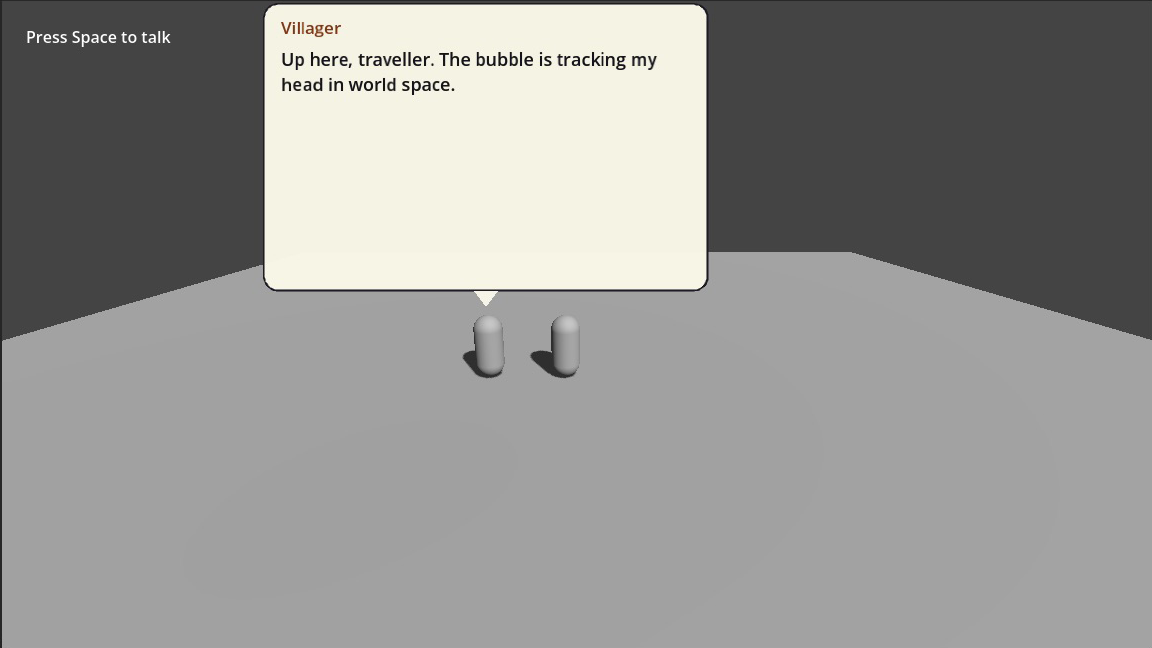
Hộp vẫn nằm trên CanvasLayer chứ không thành một phần của scene 3D. Nó là UI, không phải hình khối: gắn vào nhân vật thì chữ sẽ to nhỏ theo camera.
Một điểm cố định, không có nhân vật
Không có chế độ "vị trí trong thế giới", và đó là cố ý. Đặt một Marker2D hay Marker3D ở chỗ tấm biển hay ngôi miếu rồi chọn nó làm Target node. Kéo marker trong viewport thì thấy hộp sẽ nằm đâu; gõ (400, 300) vào một ô thì không.
Từ script
Mọi thứ ở trên cũng làm được bằng GDScript, cho placement tạo lúc chạy game.
Ghim vào màn hình:
extends Node

## Docs: /guide/anchoring — where the box sits and what it tracks.

var _camera: Camera3D
var _villager: Node3D


func _ready() -> void:
	_build()


#region screen
# Pinned to the viewport. The Classic Panel ships with this, but any box can
# use it — placement is not decided by the template you picked.
func pin_to_the_bottom() -> void:
	var anchor := TalkAnchor.new()
	anchor.mode = TalkAnchor.Mode.SCREEN
	anchor.screen_spot = TalkAnchor.Spot.BOTTOM
	anchor.screen_margin = Vector2(32.0, 32.0)
	anchor.stretch_horizontal = true
	$NPCTalkKit.quick_say_placement = anchor
#endregion


#region follow-2d
# Tracks a node. `pivot` says which part of the box lands on the target:
# (0.5, 1) puts it above, (0.5, 0) below, (1, 0.5) to its left.
func float_above_the_npc(npc: Node2D) -> void:
	var anchor := TalkAnchor.new()
	anchor.mode = TalkAnchor.Mode.NODE_FOLLOW
	anchor.follow_offset = Vector2(0.0, -96.0)
	anchor.pivot = Vector2(0.5, 1.0)
	anchor.when_offscreen = TalkAnchor.Offscreen.CLAMP
	$NPCTalkKit.quick_say_placement = anchor
	$NPCTalkKit.conversation_target = npc
#endregion


#region follow-3d
# Two offsets, and the difference matters. follow_offset_3d is world space and
# is applied before projection, so it stays on the character's head as the
# camera moves. follow_offset is a screen-space nudge applied afterwards.
func float_above_a_3d_character(character: Node3D) -> void:
	var anchor := TalkAnchor.new()
	anchor.mode = TalkAnchor.Mode.NODE_FOLLOW
	anchor.follow_offset_3d = Vector3(0.0, 1.9, 0.0)   # head height, in metres
	anchor.follow_offset = Vector2(0.0, -12.0)         # a few pixels of air
	anchor.max_distance = 30.0                         # hide beyond this
	anchor.when_offscreen = TalkAnchor.Offscreen.HIDE
	$NPCTalkKit.quick_say_placement = anchor
	$NPCTalkKit.conversation_target = character
#endregion


#region distance
# Off by default: a constant on-screen size keeps text readable at any range.
# Turn it on when the box should feel part of the world.
func shrink_with_distance(anchor: TalkAnchor) -> void:
	anchor.scale_with_distance = true
	anchor.reference_distance = 8.0
	anchor.min_scale = 0.6
	anchor.max_scale = 1.4
#endregion


func _build() -> void:
	var box := _instant_box()
	var talk := NPCTalkKit.new()
	talk.name = "NPCTalkKit"
	talk.dialogue_boxes = [box]
	add_child(talk)

	_camera = Camera3D.new()
	_camera.position = Vector3(0.0, 0.0, 10.0)
	add_child(_camera)
	_camera.make_current()

	_villager = Node3D.new()
	add_child(_villager)


func _verify() -> Array[String]:
	var failures: Array[String] = []
	var box := Vector2(400.0, 100.0)
	var talk: NPCTalkKit = $NPCTalkKit

	pin_to_the_bottom()
	var screen := talk.quick_say_placement.resolve(self, box)
	var view := get_viewport().get_visible_rect().size
	if not screen.visible or not is_equal_approx(screen.position.y, view.y - 100.0 - 32.0):
		failures.append("anchoring: the screen anchor did not sit on the bottom margin")

	float_above_a_3d_character(_villager)
	var tracked := talk.quick_say_placement.resolve(self, box, _villager)
	if not tracked.visible:
		failures.append("anchoring: a character in front of the camera must be visible")

	# Behind the camera must hide, not mirror across the screen.
	_villager.position = Vector3(0.0, 0.0, 40.0)
	if talk.quick_say_placement.resolve(self, box, _villager).visible:
		failures.append("anchoring: a target behind the camera must be hidden")
	_villager.position = Vector3.ZERO

	# Past max_distance must hide.
	_camera.position = Vector3(0.0, 0.0, 100.0)
	if talk.quick_say_placement.resolve(self, box, _villager).visible:
		failures.append("anchoring: max_distance did not hide the box")
	_camera.position = Vector3(0.0, 0.0, 10.0)

	shrink_with_distance(talk.quick_say_placement)
	var scaled := talk.quick_say_placement.resolve(self, box, _villager)
	if is_equal_approx(scaled.scale, 1.0):
		failures.append("anchoring: distance scaling had no effect")
	return failures


## Typing speed lives on the dialogue box now, so turning it off for a scripted
## run means handing the node a box that types instantly.
func _instant_box() -> TalkBoxTemplate:
	var template := TalkBoxTemplate.new()
	template.typewriter_speed = 0.0
	return template
Bám theo nhân vật 2D:
extends Node

## Docs: /guide/anchoring — where the box sits and what it tracks.

var _camera: Camera3D
var _villager: Node3D


func _ready() -> void:
	_build()


#region screen
# Pinned to the viewport. The Classic Panel ships with this, but any box can
# use it — placement is not decided by the template you picked.
func pin_to_the_bottom() -> void:
	var anchor := TalkAnchor.new()
	anchor.mode = TalkAnchor.Mode.SCREEN
	anchor.screen_spot = TalkAnchor.Spot.BOTTOM
	anchor.screen_margin = Vector2(32.0, 32.0)
	anchor.stretch_horizontal = true
	$NPCTalkKit.quick_say_placement = anchor
#endregion


#region follow-2d
# Tracks a node. `pivot` says which part of the box lands on the target:
# (0.5, 1) puts it above, (0.5, 0) below, (1, 0.5) to its left.
func float_above_the_npc(npc: Node2D) -> void:
	var anchor := TalkAnchor.new()
	anchor.mode = TalkAnchor.Mode.NODE_FOLLOW
	anchor.follow_offset = Vector2(0.0, -96.0)
	anchor.pivot = Vector2(0.5, 1.0)
	anchor.when_offscreen = TalkAnchor.Offscreen.CLAMP
	$NPCTalkKit.quick_say_placement = anchor
	$NPCTalkKit.conversation_target = npc
#endregion


#region follow-3d
# Two offsets, and the difference matters. follow_offset_3d is world space and
# is applied before projection, so it stays on the character's head as the
# camera moves. follow_offset is a screen-space nudge applied afterwards.
func float_above_a_3d_character(character: Node3D) -> void:
	var anchor := TalkAnchor.new()
	anchor.mode = TalkAnchor.Mode.NODE_FOLLOW
	anchor.follow_offset_3d = Vector3(0.0, 1.9, 0.0)   # head height, in metres
	anchor.follow_offset = Vector2(0.0, -12.0)         # a few pixels of air
	anchor.max_distance = 30.0                         # hide beyond this
	anchor.when_offscreen = TalkAnchor.Offscreen.HIDE
	$NPCTalkKit.quick_say_placement = anchor
	$NPCTalkKit.conversation_target = character
#endregion


#region distance
# Off by default: a constant on-screen size keeps text readable at any range.
# Turn it on when the box should feel part of the world.
func shrink_with_distance(anchor: TalkAnchor) -> void:
	anchor.scale_with_distance = true
	anchor.reference_distance = 8.0
	anchor.min_scale = 0.6
	anchor.max_scale = 1.4
#endregion


func _build() -> void:
	var box := _instant_box()
	var talk := NPCTalkKit.new()
	talk.name = "NPCTalkKit"
	talk.dialogue_boxes = [box]
	add_child(talk)

	_camera = Camera3D.new()
	_camera.position = Vector3(0.0, 0.0, 10.0)
	add_child(_camera)
	_camera.make_current()

	_villager = Node3D.new()
	add_child(_villager)


func _verify() -> Array[String]:
	var failures: Array[String] = []
	var box := Vector2(400.0, 100.0)
	var talk: NPCTalkKit = $NPCTalkKit

	pin_to_the_bottom()
	var screen := talk.quick_say_placement.resolve(self, box)
	var view := get_viewport().get_visible_rect().size
	if not screen.visible or not is_equal_approx(screen.position.y, view.y - 100.0 - 32.0):
		failures.append("anchoring: the screen anchor did not sit on the bottom margin")

	float_above_a_3d_character(_villager)
	var tracked := talk.quick_say_placement.resolve(self, box, _villager)
	if not tracked.visible:
		failures.append("anchoring: a character in front of the camera must be visible")

	# Behind the camera must hide, not mirror across the screen.
	_villager.position = Vector3(0.0, 0.0, 40.0)
	if talk.quick_say_placement.resolve(self, box, _villager).visible:
		failures.append("anchoring: a target behind the camera must be hidden")
	_villager.position = Vector3.ZERO

	# Past max_distance must hide.
	_camera.position = Vector3(0.0, 0.0, 100.0)
	if talk.quick_say_placement.resolve(self, box, _villager).visible:
		failures.append("anchoring: max_distance did not hide the box")
	_camera.position = Vector3(0.0, 0.0, 10.0)

	shrink_with_distance(talk.quick_say_placement)
	var scaled := talk.quick_say_placement.resolve(self, box, _villager)
	if is_equal_approx(scaled.scale, 1.0):
		failures.append("anchoring: distance scaling had no effect")
	return failures


## Typing speed lives on the dialogue box now, so turning it off for a scripted
## run means handing the node a box that types instantly.
func _instant_box() -> TalkBoxTemplate:
	var template := TalkBoxTemplate.new()
	template.typewriter_speed = 0.0
	return template
Bám theo nhân vật 3D:
extends Node

## Docs: /guide/anchoring — where the box sits and what it tracks.

var _camera: Camera3D
var _villager: Node3D


func _ready() -> void:
	_build()


#region screen
# Pinned to the viewport. The Classic Panel ships with this, but any box can
# use it — placement is not decided by the template you picked.
func pin_to_the_bottom() -> void:
	var anchor := TalkAnchor.new()
	anchor.mode = TalkAnchor.Mode.SCREEN
	anchor.screen_spot = TalkAnchor.Spot.BOTTOM
	anchor.screen_margin = Vector2(32.0, 32.0)
	anchor.stretch_horizontal = true
	$NPCTalkKit.quick_say_placement = anchor
#endregion


#region follow-2d
# Tracks a node. `pivot` says which part of the box lands on the target:
# (0.5, 1) puts it above, (0.5, 0) below, (1, 0.5) to its left.
func float_above_the_npc(npc: Node2D) -> void:
	var anchor := TalkAnchor.new()
	anchor.mode = TalkAnchor.Mode.NODE_FOLLOW
	anchor.follow_offset = Vector2(0.0, -96.0)
	anchor.pivot = Vector2(0.5, 1.0)
	anchor.when_offscreen = TalkAnchor.Offscreen.CLAMP
	$NPCTalkKit.quick_say_placement = anchor
	$NPCTalkKit.conversation_target = npc
#endregion


#region follow-3d
# Two offsets, and the difference matters. follow_offset_3d is world space and
# is applied before projection, so it stays on the character's head as the
# camera moves. follow_offset is a screen-space nudge applied afterwards.
func float_above_a_3d_character(character: Node3D) -> void:
	var anchor := TalkAnchor.new()
	anchor.mode = TalkAnchor.Mode.NODE_FOLLOW
	anchor.follow_offset_3d = Vector3(0.0, 1.9, 0.0)   # head height, in metres
	anchor.follow_offset = Vector2(0.0, -12.0)         # a few pixels of air
	anchor.max_distance = 30.0                         # hide beyond this
	anchor.when_offscreen = TalkAnchor.Offscreen.HIDE
	$NPCTalkKit.quick_say_placement = anchor
	$NPCTalkKit.conversation_target = character
#endregion


#region distance
# Off by default: a constant on-screen size keeps text readable at any range.
# Turn it on when the box should feel part of the world.
func shrink_with_distance(anchor: TalkAnchor) -> void:
	anchor.scale_with_distance = true
	anchor.reference_distance = 8.0
	anchor.min_scale = 0.6
	anchor.max_scale = 1.4
#endregion


func _build() -> void:
	var box := _instant_box()
	var talk := NPCTalkKit.new()
	talk.name = "NPCTalkKit"
	talk.dialogue_boxes = [box]
	add_child(talk)

	_camera = Camera3D.new()
	_camera.position = Vector3(0.0, 0.0, 10.0)
	add_child(_camera)
	_camera.make_current()

	_villager = Node3D.new()
	add_child(_villager)


func _verify() -> Array[String]:
	var failures: Array[String] = []
	var box := Vector2(400.0, 100.0)
	var talk: NPCTalkKit = $NPCTalkKit

	pin_to_the_bottom()
	var screen := talk.quick_say_placement.resolve(self, box)
	var view := get_viewport().get_visible_rect().size
	if not screen.visible or not is_equal_approx(screen.position.y, view.y - 100.0 - 32.0):
		failures.append("anchoring: the screen anchor did not sit on the bottom margin")

	float_above_a_3d_character(_villager)
	var tracked := talk.quick_say_placement.resolve(self, box, _villager)
	if not tracked.visible:
		failures.append("anchoring: a character in front of the camera must be visible")

	# Behind the camera must hide, not mirror across the screen.
	_villager.position = Vector3(0.0, 0.0, 40.0)
	if talk.quick_say_placement.resolve(self, box, _villager).visible:
		failures.append("anchoring: a target behind the camera must be hidden")
	_villager.position = Vector3.ZERO

	# Past max_distance must hide.
	_camera.position = Vector3(0.0, 0.0, 100.0)
	if talk.quick_say_placement.resolve(self, box, _villager).visible:
		failures.append("anchoring: max_distance did not hide the box")
	_camera.position = Vector3(0.0, 0.0, 10.0)

	shrink_with_distance(talk.quick_say_placement)
	var scaled := talk.quick_say_placement.resolve(self, box, _villager)
	if is_equal_approx(scaled.scale, 1.0):
		failures.append("anchoring: distance scaling had no effect")
	return failures


## Typing speed lives on the dialogue box now, so turning it off for a scripted
## run means handing the node a box that types instantly.
func _instant_box() -> TalkBoxTemplate:
	var template := TalkBoxTemplate.new()
	template.typewriter_speed = 0.0
	return template
Kích thước theo khoảng cách:
extends Node

## Docs: /guide/anchoring — where the box sits and what it tracks.

var _camera: Camera3D
var _villager: Node3D


func _ready() -> void:
	_build()


#region screen
# Pinned to the viewport. The Classic Panel ships with this, but any box can
# use it — placement is not decided by the template you picked.
func pin_to_the_bottom() -> void:
	var anchor := TalkAnchor.new()
	anchor.mode = TalkAnchor.Mode.SCREEN
	anchor.screen_spot = TalkAnchor.Spot.BOTTOM
	anchor.screen_margin = Vector2(32.0, 32.0)
	anchor.stretch_horizontal = true
	$NPCTalkKit.quick_say_placement = anchor
#endregion


#region follow-2d
# Tracks a node. `pivot` says which part of the box lands on the target:
# (0.5, 1) puts it above, (0.5, 0) below, (1, 0.5) to its left.
func float_above_the_npc(npc: Node2D) -> void:
	var anchor := TalkAnchor.new()
	anchor.mode = TalkAnchor.Mode.NODE_FOLLOW
	anchor.follow_offset = Vector2(0.0, -96.0)
	anchor.pivot = Vector2(0.5, 1.0)
	anchor.when_offscreen = TalkAnchor.Offscreen.CLAMP
	$NPCTalkKit.quick_say_placement = anchor
	$NPCTalkKit.conversation_target = npc
#endregion


#region follow-3d
# Two offsets, and the difference matters. follow_offset_3d is world space and
# is applied before projection, so it stays on the character's head as the
# camera moves. follow_offset is a screen-space nudge applied afterwards.
func float_above_a_3d_character(character: Node3D) -> void:
	var anchor := TalkAnchor.new()
	anchor.mode = TalkAnchor.Mode.NODE_FOLLOW
	anchor.follow_offset_3d = Vector3(0.0, 1.9, 0.0)   # head height, in metres
	anchor.follow_offset = Vector2(0.0, -12.0)         # a few pixels of air
	anchor.max_distance = 30.0                         # hide beyond this
	anchor.when_offscreen = TalkAnchor.Offscreen.HIDE
	$NPCTalkKit.quick_say_placement = anchor
	$NPCTalkKit.conversation_target = character
#endregion


#region distance
# Off by default: a constant on-screen size keeps text readable at any range.
# Turn it on when the box should feel part of the world.
func shrink_with_distance(anchor: TalkAnchor) -> void:
	anchor.scale_with_distance = true
	anchor.reference_distance = 8.0
	anchor.min_scale = 0.6
	anchor.max_scale = 1.4
#endregion


func _build() -> void:
	var box := _instant_box()
	var talk := NPCTalkKit.new()
	talk.name = "NPCTalkKit"
	talk.dialogue_boxes = [box]
	add_child(talk)

	_camera = Camera3D.new()
	_camera.position = Vector3(0.0, 0.0, 10.0)
	add_child(_camera)
	_camera.make_current()

	_villager = Node3D.new()
	add_child(_villager)


func _verify() -> Array[String]:
	var failures: Array[String] = []
	var box := Vector2(400.0, 100.0)
	var talk: NPCTalkKit = $NPCTalkKit

	pin_to_the_bottom()
	var screen := talk.quick_say_placement.resolve(self, box)
	var view := get_viewport().get_visible_rect().size
	if not screen.visible or not is_equal_approx(screen.position.y, view.y - 100.0 - 32.0):
		failures.append("anchoring: the screen anchor did not sit on the bottom margin")

	float_above_a_3d_character(_villager)
	var tracked := talk.quick_say_placement.resolve(self, box, _villager)
	if not tracked.visible:
		failures.append("anchoring: a character in front of the camera must be visible")

	# Behind the camera must hide, not mirror across the screen.
	_villager.position = Vector3(0.0, 0.0, 40.0)
	if talk.quick_say_placement.resolve(self, box, _villager).visible:
		failures.append("anchoring: a target behind the camera must be hidden")
	_villager.position = Vector3.ZERO

	# Past max_distance must hide.
	_camera.position = Vector3(0.0, 0.0, 100.0)
	if talk.quick_say_placement.resolve(self, box, _villager).visible:
		failures.append("anchoring: max_distance did not hide the box")
	_camera.position = Vector3(0.0, 0.0, 10.0)

	shrink_with_distance(talk.quick_say_placement)
	var scaled := talk.quick_say_placement.resolve(self, box, _villager)
	if is_equal_approx(scaled.scale, 1.0):
		failures.append("anchoring: distance scaling had no effect")
	return failures


## Typing speed lives on the dialogue box now, so turning it off for a scripted
## run means handing the node a box that types instantly.
func _instant_box() -> TalkBoxTemplate:
	var template := TalkBoxTemplate.new()
	template.typewriter_speed = 0.0
	return template
Cho một thứ khác hẳn, như một khớp xương trong skeleton, kế thừa TalkAnchor và override resolve(). Mọi chế độ có sẵn đều đi qua đúng phương thức đó.