
Placement
Placement decides where the box sits and what it follows. It is separate from the box on purpose: a Classic Panel can follow an NPC, and a Speech Bubble can pin to a screen corner.
Where you set it
In Conversations, the Defaults row has a placement menu:

| Choice | Result |
|---|---|
| Use dialogue box placement | the box's own default: a panel pins to the bottom of the screen, a bubble follows the NPC |
| Screen placement | pinned to the screen |
| Follow target | follows a character |
| Advanced placement properties… | opens the Placement editor, below |
One line can sit somewhere else, such as a bubble over whoever interrupts: select it and use Placement → Customize placement in its options.
Most NPCs never need any of this. The default already looks right.
Pinned to the screen
In the Placement editor, set the mode to Screen.
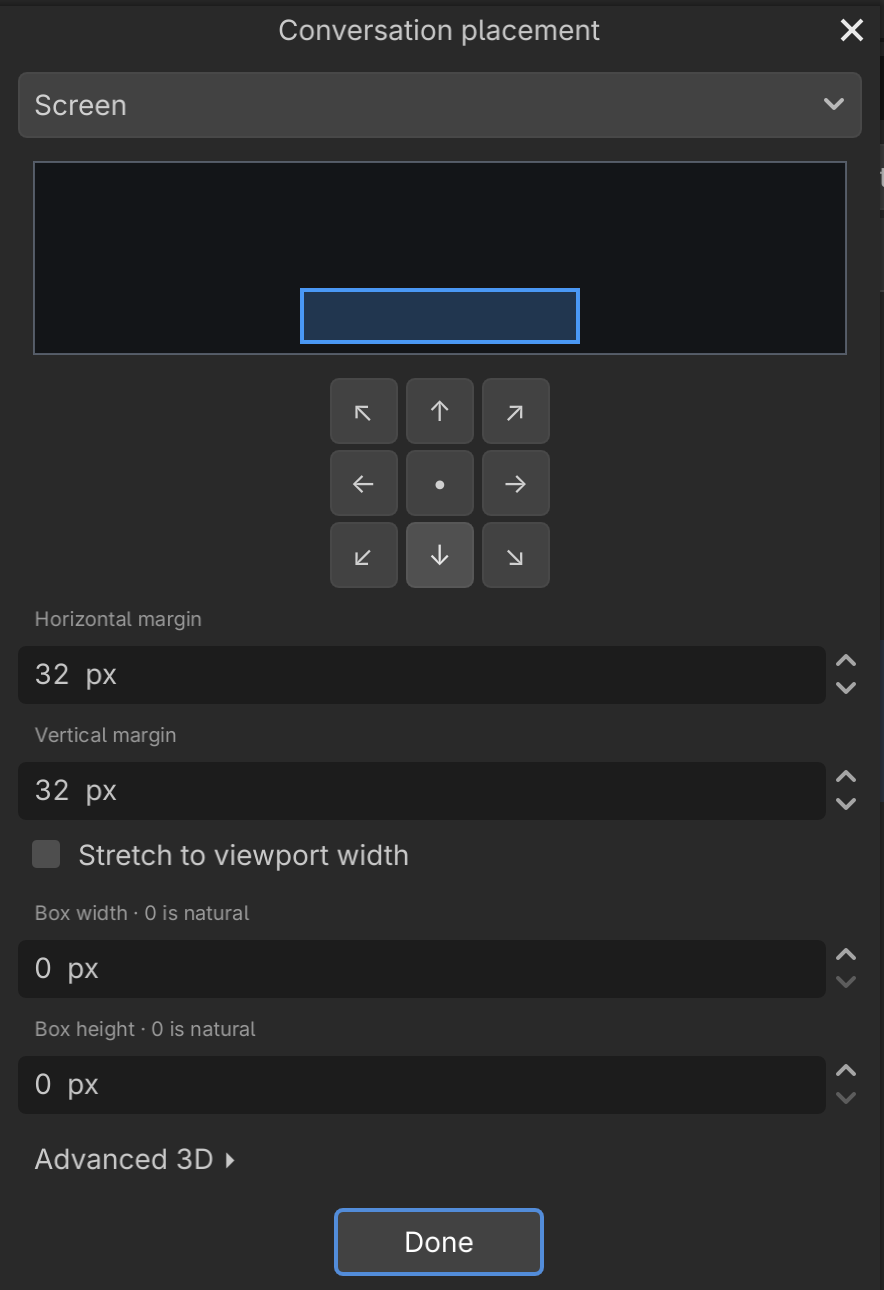
| Field | Meaning |
|---|---|
| the 3×3 map | which corner, edge or the centre the box sits at |
| Horizontal margin, Vertical margin | the distance from the edge |
| Stretch to viewport width | fill the width of the screen, minus the margin |
| Box width, Box height | the least size; 0 keeps the natural one |
The box always fits the screen. A set size is a floor: a line that needs more room grows the box rather than spilling out. With no width set, text wraps at about 440 px, never wider than the screen, and a long speaker name is shortened before it would leave the box. Ornaments, a name on the top edge and a tail count as part of the box, so they stay on screen too.
Following a character
Set the mode to Follow node.
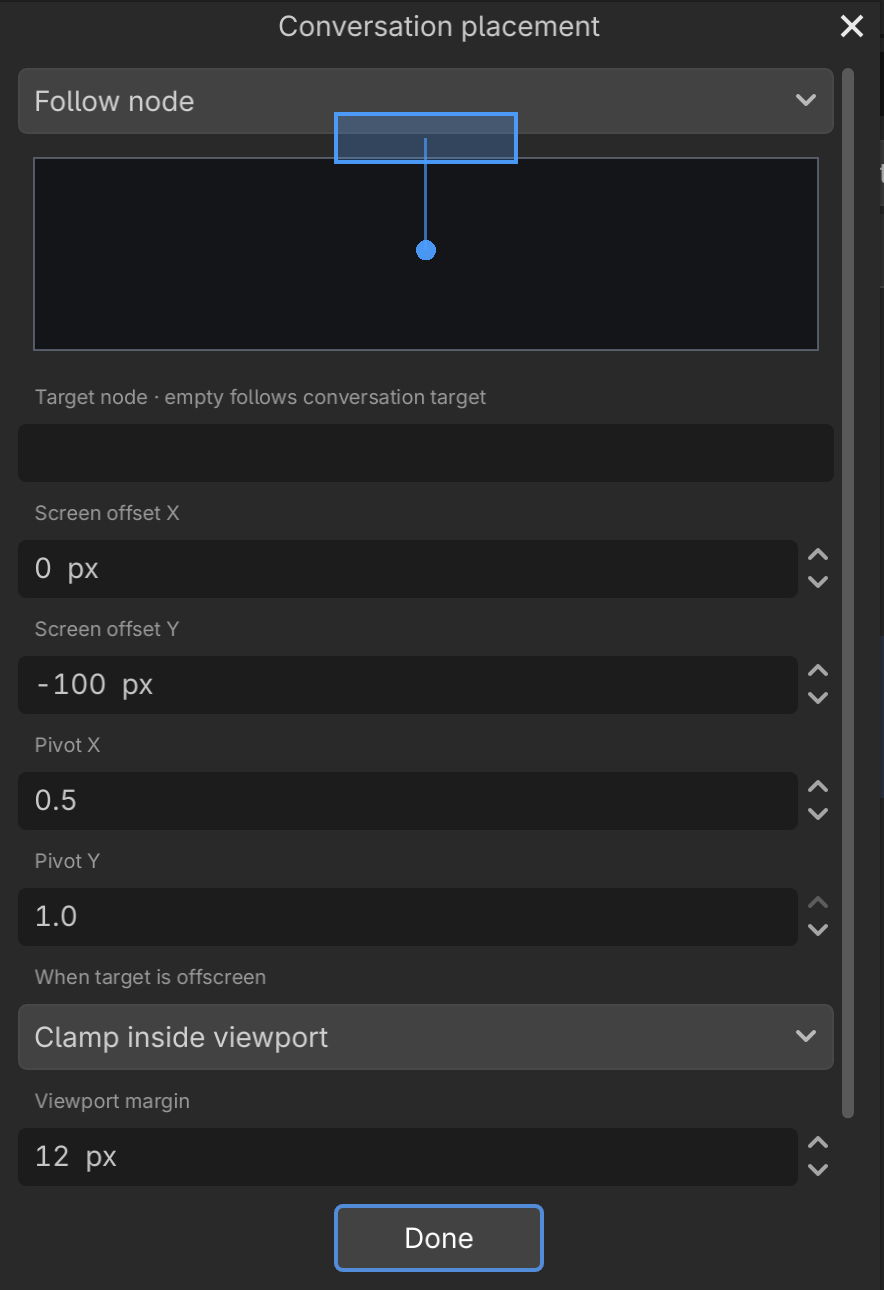
| Field | Meaning |
|---|---|
| Target node | what to follow, as a path from the NPCTalkKit node. Empty follows the NPC the node belongs to |
| Screen offset X / Y | how far from the target, in pixels; Y of -96 sits 96 px above it |
| Pivot X / Y | which part of the box lands on that point |
| When target is offscreen | Clamp inside viewport, Hide when offscreen, or Allow offscreen |
| Viewport margin | how close to the screen edge a clamped box may go |
Pivot replaces "above / below / left / right":
| Pivot X, Y | Result |
|---|---|
0.5, 1 | above the target |
0.5, 0 | below it |
1, 0.5 | to its left |
0, 0.5 | to its right |
Clamp inside viewport is the default, because a line the player cannot read is worse than a bubble slightly out of place. When the screen edge would push a box over its speaker, it moves to the other side of them and the tail flips to follow.
The target path is relative to the NPCTalkKit node, so one placement saved as a shared resource works on every NPC built the same way.
3D
Everything above works in 3D too: a Node3D target is projected through the active Camera3D. Open Advanced 3D ▸ in the Placement editor for the parts only 3D needs:
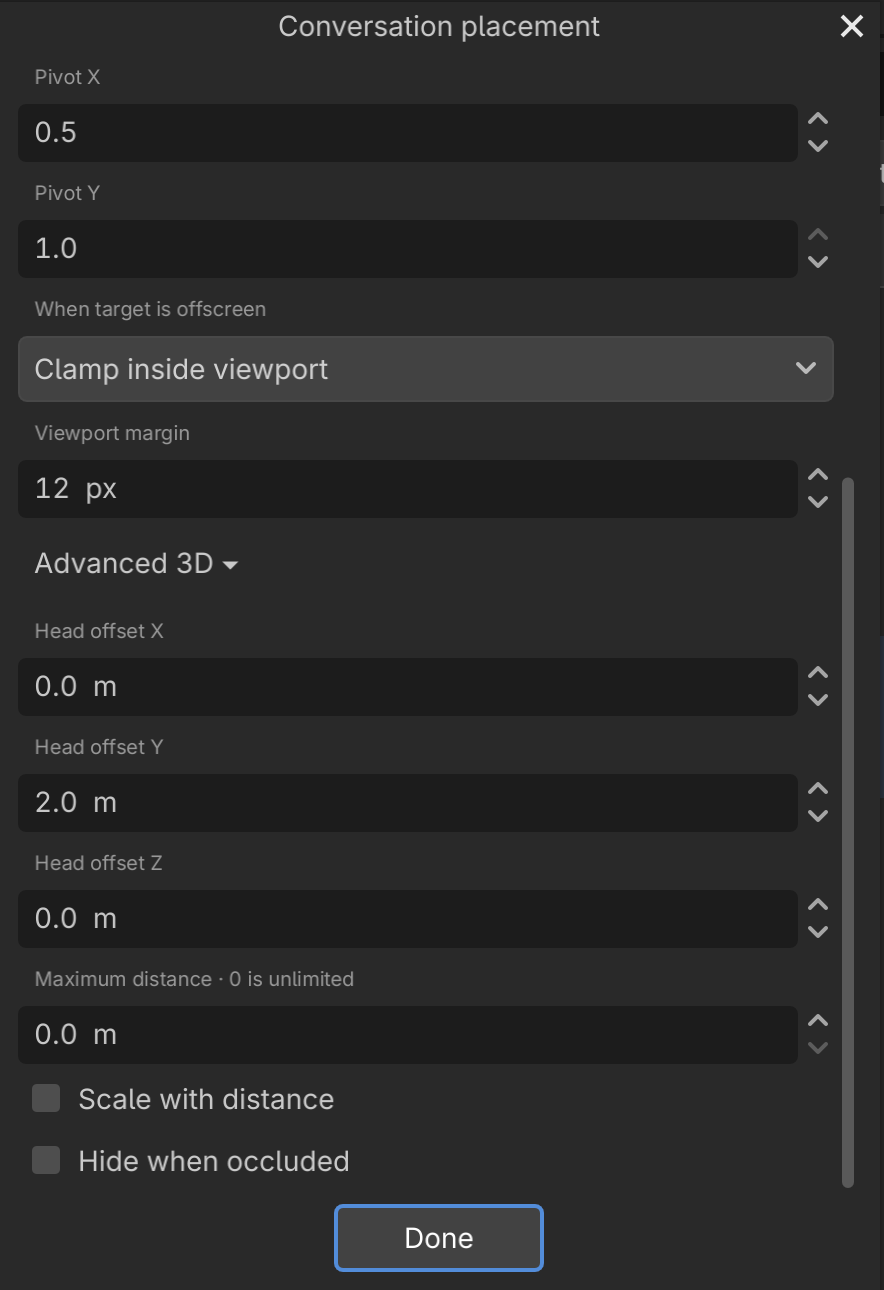
| Field | Meaning |
|---|---|
| Head offset X / Y / Z | where on the character the box points, in metres, such as Y of 2 for the top of the head |
| Maximum distance | hide the box when the character is farther away; 0 is unlimited |
| Scale with distance | make the box smaller as the character gets farther away |
| Hide when occluded | hide the box when a wall is between the camera and the character |
Four things 2D never has to think about, all handled:
- Behind the camera. A point behind the camera would land on the opposite side of the screen. TalkKit hides the box instead.
- Two offsets. Head offset is in the world, so it stays on the head as the camera moves. Screen offset is a nudge on screen after that. A screen offset alone drifts off the head as the camera comes closer.
- Distance. Maximum distance hides the box beyond a range.
- Walls. Hide when occluded checks a ray from the camera every physics frame. It is off by default, because it is the only per-frame cost here.
Scale with distance is off by default too: a fixed size keeps the text readable at any range.
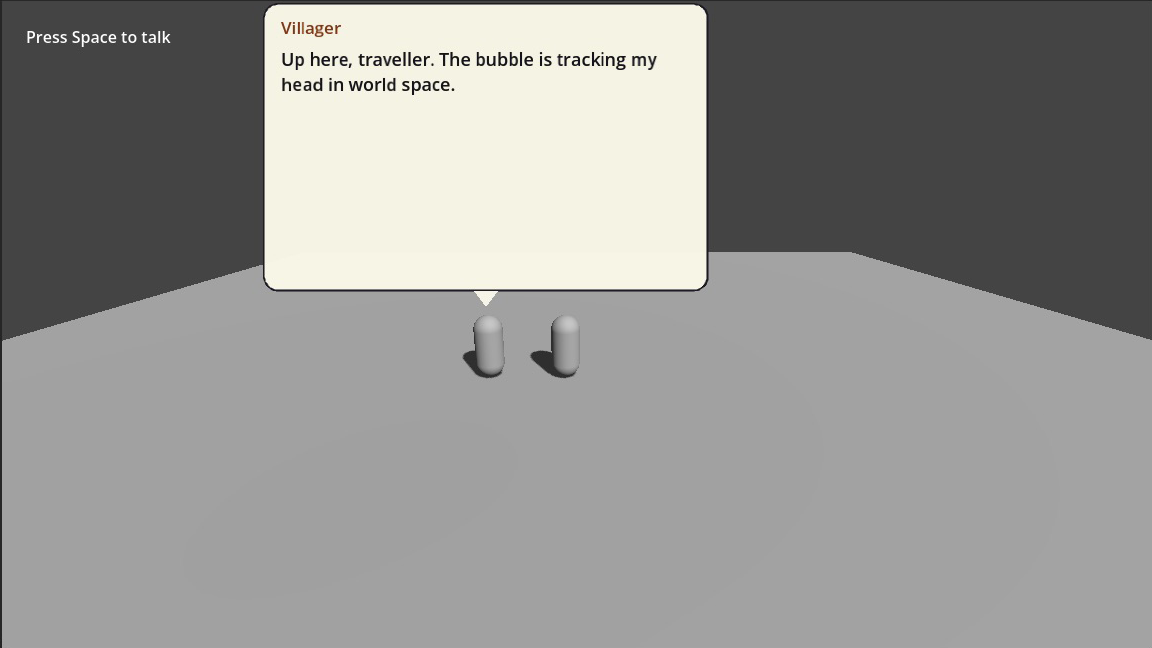
The box stays on a CanvasLayer rather than becoming part of the 3D scene. It is UI, not geometry: parented to the character, its text would scale with the camera.
A fixed point, with no character
There is no "world position" mode, on purpose. Drop a Marker2D or Marker3D where the sign or the shrine stands and set it as the Target node. Dragging a marker in the viewport shows you where the box goes; typing (400, 300) into a field does not.
From a script
Everything above can also be done in GDScript, for placements made at run time.
Pinned to the screen:
extends Node

## Docs: /guide/anchoring — where the box sits and what it tracks.

var _camera: Camera3D
var _villager: Node3D


func _ready() -> void:
	_build()


#region screen
# Pinned to the viewport. The Classic Panel ships with this, but any box can
# use it — placement is not decided by the template you picked.
func pin_to_the_bottom() -> void:
	var anchor := TalkAnchor.new()
	anchor.mode = TalkAnchor.Mode.SCREEN
	anchor.screen_spot = TalkAnchor.Spot.BOTTOM
	anchor.screen_margin = Vector2(32.0, 32.0)
	anchor.stretch_horizontal = true
	$NPCTalkKit.quick_say_placement = anchor
#endregion


#region follow-2d
# Tracks a node. `pivot` says which part of the box lands on the target:
# (0.5, 1) puts it above, (0.5, 0) below, (1, 0.5) to its left.
func float_above_the_npc(npc: Node2D) -> void:
	var anchor := TalkAnchor.new()
	anchor.mode = TalkAnchor.Mode.NODE_FOLLOW
	anchor.follow_offset = Vector2(0.0, -96.0)
	anchor.pivot = Vector2(0.5, 1.0)
	anchor.when_offscreen = TalkAnchor.Offscreen.CLAMP
	$NPCTalkKit.quick_say_placement = anchor
	$NPCTalkKit.conversation_target = npc
#endregion


#region follow-3d
# Two offsets, and the difference matters. follow_offset_3d is world space and
# is applied before projection, so it stays on the character's head as the
# camera moves. follow_offset is a screen-space nudge applied afterwards.
func float_above_a_3d_character(character: Node3D) -> void:
	var anchor := TalkAnchor.new()
	anchor.mode = TalkAnchor.Mode.NODE_FOLLOW
	anchor.follow_offset_3d = Vector3(0.0, 1.9, 0.0)   # head height, in metres
	anchor.follow_offset = Vector2(0.0, -12.0)         # a few pixels of air
	anchor.max_distance = 30.0                         # hide beyond this
	anchor.when_offscreen = TalkAnchor.Offscreen.HIDE
	$NPCTalkKit.quick_say_placement = anchor
	$NPCTalkKit.conversation_target = character
#endregion


#region distance
# Off by default: a constant on-screen size keeps text readable at any range.
# Turn it on when the box should feel part of the world.
func shrink_with_distance(anchor: TalkAnchor) -> void:
	anchor.scale_with_distance = true
	anchor.reference_distance = 8.0
	anchor.min_scale = 0.6
	anchor.max_scale = 1.4
#endregion


func _build() -> void:
	var box := _instant_box()
	var talk := NPCTalkKit.new()
	talk.name = "NPCTalkKit"
	talk.dialogue_boxes = [box]
	add_child(talk)

	_camera = Camera3D.new()
	_camera.position = Vector3(0.0, 0.0, 10.0)
	add_child(_camera)
	_camera.make_current()

	_villager = Node3D.new()
	add_child(_villager)


func _verify() -> Array[String]:
	var failures: Array[String] = []
	var box := Vector2(400.0, 100.0)
	var talk: NPCTalkKit = $NPCTalkKit

	pin_to_the_bottom()
	var screen := talk.quick_say_placement.resolve(self, box)
	var view := get_viewport().get_visible_rect().size
	if not screen.visible or not is_equal_approx(screen.position.y, view.y - 100.0 - 32.0):
		failures.append("anchoring: the screen anchor did not sit on the bottom margin")

	float_above_a_3d_character(_villager)
	var tracked := talk.quick_say_placement.resolve(self, box, _villager)
	if not tracked.visible:
		failures.append("anchoring: a character in front of the camera must be visible")

	# Behind the camera must hide, not mirror across the screen.
	_villager.position = Vector3(0.0, 0.0, 40.0)
	if talk.quick_say_placement.resolve(self, box, _villager).visible:
		failures.append("anchoring: a target behind the camera must be hidden")
	_villager.position = Vector3.ZERO

	# Past max_distance must hide.
	_camera.position = Vector3(0.0, 0.0, 100.0)
	if talk.quick_say_placement.resolve(self, box, _villager).visible:
		failures.append("anchoring: max_distance did not hide the box")
	_camera.position = Vector3(0.0, 0.0, 10.0)

	shrink_with_distance(talk.quick_say_placement)
	var scaled := talk.quick_say_placement.resolve(self, box, _villager)
	if is_equal_approx(scaled.scale, 1.0):
		failures.append("anchoring: distance scaling had no effect")
	return failures


## Typing speed lives on the dialogue box now, so turning it off for a scripted
## run means handing the node a box that types instantly.
func _instant_box() -> TalkBoxTemplate:
	var template := TalkBoxTemplate.new()
	template.typewriter_speed = 0.0
	return template
Following a 2D character:
extends Node

## Docs: /guide/anchoring — where the box sits and what it tracks.

var _camera: Camera3D
var _villager: Node3D


func _ready() -> void:
	_build()


#region screen
# Pinned to the viewport. The Classic Panel ships with this, but any box can
# use it — placement is not decided by the template you picked.
func pin_to_the_bottom() -> void:
	var anchor := TalkAnchor.new()
	anchor.mode = TalkAnchor.Mode.SCREEN
	anchor.screen_spot = TalkAnchor.Spot.BOTTOM
	anchor.screen_margin = Vector2(32.0, 32.0)
	anchor.stretch_horizontal = true
	$NPCTalkKit.quick_say_placement = anchor
#endregion


#region follow-2d
# Tracks a node. `pivot` says which part of the box lands on the target:
# (0.5, 1) puts it above, (0.5, 0) below, (1, 0.5) to its left.
func float_above_the_npc(npc: Node2D) -> void:
	var anchor := TalkAnchor.new()
	anchor.mode = TalkAnchor.Mode.NODE_FOLLOW
	anchor.follow_offset = Vector2(0.0, -96.0)
	anchor.pivot = Vector2(0.5, 1.0)
	anchor.when_offscreen = TalkAnchor.Offscreen.CLAMP
	$NPCTalkKit.quick_say_placement = anchor
	$NPCTalkKit.conversation_target = npc
#endregion


#region follow-3d
# Two offsets, and the difference matters. follow_offset_3d is world space and
# is applied before projection, so it stays on the character's head as the
# camera moves. follow_offset is a screen-space nudge applied afterwards.
func float_above_a_3d_character(character: Node3D) -> void:
	var anchor := TalkAnchor.new()
	anchor.mode = TalkAnchor.Mode.NODE_FOLLOW
	anchor.follow_offset_3d = Vector3(0.0, 1.9, 0.0)   # head height, in metres
	anchor.follow_offset = Vector2(0.0, -12.0)         # a few pixels of air
	anchor.max_distance = 30.0                         # hide beyond this
	anchor.when_offscreen = TalkAnchor.Offscreen.HIDE
	$NPCTalkKit.quick_say_placement = anchor
	$NPCTalkKit.conversation_target = character
#endregion


#region distance
# Off by default: a constant on-screen size keeps text readable at any range.
# Turn it on when the box should feel part of the world.
func shrink_with_distance(anchor: TalkAnchor) -> void:
	anchor.scale_with_distance = true
	anchor.reference_distance = 8.0
	anchor.min_scale = 0.6
	anchor.max_scale = 1.4
#endregion


func _build() -> void:
	var box := _instant_box()
	var talk := NPCTalkKit.new()
	talk.name = "NPCTalkKit"
	talk.dialogue_boxes = [box]
	add_child(talk)

	_camera = Camera3D.new()
	_camera.position = Vector3(0.0, 0.0, 10.0)
	add_child(_camera)
	_camera.make_current()

	_villager = Node3D.new()
	add_child(_villager)


func _verify() -> Array[String]:
	var failures: Array[String] = []
	var box := Vector2(400.0, 100.0)
	var talk: NPCTalkKit = $NPCTalkKit

	pin_to_the_bottom()
	var screen := talk.quick_say_placement.resolve(self, box)
	var view := get_viewport().get_visible_rect().size
	if not screen.visible or not is_equal_approx(screen.position.y, view.y - 100.0 - 32.0):
		failures.append("anchoring: the screen anchor did not sit on the bottom margin")

	float_above_a_3d_character(_villager)
	var tracked := talk.quick_say_placement.resolve(self, box, _villager)
	if not tracked.visible:
		failures.append("anchoring: a character in front of the camera must be visible")

	# Behind the camera must hide, not mirror across the screen.
	_villager.position = Vector3(0.0, 0.0, 40.0)
	if talk.quick_say_placement.resolve(self, box, _villager).visible:
		failures.append("anchoring: a target behind the camera must be hidden")
	_villager.position = Vector3.ZERO

	# Past max_distance must hide.
	_camera.position = Vector3(0.0, 0.0, 100.0)
	if talk.quick_say_placement.resolve(self, box, _villager).visible:
		failures.append("anchoring: max_distance did not hide the box")
	_camera.position = Vector3(0.0, 0.0, 10.0)

	shrink_with_distance(talk.quick_say_placement)
	var scaled := talk.quick_say_placement.resolve(self, box, _villager)
	if is_equal_approx(scaled.scale, 1.0):
		failures.append("anchoring: distance scaling had no effect")
	return failures


## Typing speed lives on the dialogue box now, so turning it off for a scripted
## run means handing the node a box that types instantly.
func _instant_box() -> TalkBoxTemplate:
	var template := TalkBoxTemplate.new()
	template.typewriter_speed = 0.0
	return template
Following a 3D character:
extends Node

## Docs: /guide/anchoring — where the box sits and what it tracks.

var _camera: Camera3D
var _villager: Node3D


func _ready() -> void:
	_build()


#region screen
# Pinned to the viewport. The Classic Panel ships with this, but any box can
# use it — placement is not decided by the template you picked.
func pin_to_the_bottom() -> void:
	var anchor := TalkAnchor.new()
	anchor.mode = TalkAnchor.Mode.SCREEN
	anchor.screen_spot = TalkAnchor.Spot.BOTTOM
	anchor.screen_margin = Vector2(32.0, 32.0)
	anchor.stretch_horizontal = true
	$NPCTalkKit.quick_say_placement = anchor
#endregion


#region follow-2d
# Tracks a node. `pivot` says which part of the box lands on the target:
# (0.5, 1) puts it above, (0.5, 0) below, (1, 0.5) to its left.
func float_above_the_npc(npc: Node2D) -> void:
	var anchor := TalkAnchor.new()
	anchor.mode = TalkAnchor.Mode.NODE_FOLLOW
	anchor.follow_offset = Vector2(0.0, -96.0)
	anchor.pivot = Vector2(0.5, 1.0)
	anchor.when_offscreen = TalkAnchor.Offscreen.CLAMP
	$NPCTalkKit.quick_say_placement = anchor
	$NPCTalkKit.conversation_target = npc
#endregion


#region follow-3d
# Two offsets, and the difference matters. follow_offset_3d is world space and
# is applied before projection, so it stays on the character's head as the
# camera moves. follow_offset is a screen-space nudge applied afterwards.
func float_above_a_3d_character(character: Node3D) -> void:
	var anchor := TalkAnchor.new()
	anchor.mode = TalkAnchor.Mode.NODE_FOLLOW
	anchor.follow_offset_3d = Vector3(0.0, 1.9, 0.0)   # head height, in metres
	anchor.follow_offset = Vector2(0.0, -12.0)         # a few pixels of air
	anchor.max_distance = 30.0                         # hide beyond this
	anchor.when_offscreen = TalkAnchor.Offscreen.HIDE
	$NPCTalkKit.quick_say_placement = anchor
	$NPCTalkKit.conversation_target = character
#endregion


#region distance
# Off by default: a constant on-screen size keeps text readable at any range.
# Turn it on when the box should feel part of the world.
func shrink_with_distance(anchor: TalkAnchor) -> void:
	anchor.scale_with_distance = true
	anchor.reference_distance = 8.0
	anchor.min_scale = 0.6
	anchor.max_scale = 1.4
#endregion


func _build() -> void:
	var box := _instant_box()
	var talk := NPCTalkKit.new()
	talk.name = "NPCTalkKit"
	talk.dialogue_boxes = [box]
	add_child(talk)

	_camera = Camera3D.new()
	_camera.position = Vector3(0.0, 0.0, 10.0)
	add_child(_camera)
	_camera.make_current()

	_villager = Node3D.new()
	add_child(_villager)


func _verify() -> Array[String]:
	var failures: Array[String] = []
	var box := Vector2(400.0, 100.0)
	var talk: NPCTalkKit = $NPCTalkKit

	pin_to_the_bottom()
	var screen := talk.quick_say_placement.resolve(self, box)
	var view := get_viewport().get_visible_rect().size
	if not screen.visible or not is_equal_approx(screen.position.y, view.y - 100.0 - 32.0):
		failures.append("anchoring: the screen anchor did not sit on the bottom margin")

	float_above_a_3d_character(_villager)
	var tracked := talk.quick_say_placement.resolve(self, box, _villager)
	if not tracked.visible:
		failures.append("anchoring: a character in front of the camera must be visible")

	# Behind the camera must hide, not mirror across the screen.
	_villager.position = Vector3(0.0, 0.0, 40.0)
	if talk.quick_say_placement.resolve(self, box, _villager).visible:
		failures.append("anchoring: a target behind the camera must be hidden")
	_villager.position = Vector3.ZERO

	# Past max_distance must hide.
	_camera.position = Vector3(0.0, 0.0, 100.0)
	if talk.quick_say_placement.resolve(self, box, _villager).visible:
		failures.append("anchoring: max_distance did not hide the box")
	_camera.position = Vector3(0.0, 0.0, 10.0)

	shrink_with_distance(talk.quick_say_placement)
	var scaled := talk.quick_say_placement.resolve(self, box, _villager)
	if is_equal_approx(scaled.scale, 1.0):
		failures.append("anchoring: distance scaling had no effect")
	return failures


## Typing speed lives on the dialogue box now, so turning it off for a scripted
## run means handing the node a box that types instantly.
func _instant_box() -> TalkBoxTemplate:
	var template := TalkBoxTemplate.new()
	template.typewriter_speed = 0.0
	return template
Size at distance:
extends Node

## Docs: /guide/anchoring — where the box sits and what it tracks.

var _camera: Camera3D
var _villager: Node3D


func _ready() -> void:
	_build()


#region screen
# Pinned to the viewport. The Classic Panel ships with this, but any box can
# use it — placement is not decided by the template you picked.
func pin_to_the_bottom() -> void:
	var anchor := TalkAnchor.new()
	anchor.mode = TalkAnchor.Mode.SCREEN
	anchor.screen_spot = TalkAnchor.Spot.BOTTOM
	anchor.screen_margin = Vector2(32.0, 32.0)
	anchor.stretch_horizontal = true
	$NPCTalkKit.quick_say_placement = anchor
#endregion


#region follow-2d
# Tracks a node. `pivot` says which part of the box lands on the target:
# (0.5, 1) puts it above, (0.5, 0) below, (1, 0.5) to its left.
func float_above_the_npc(npc: Node2D) -> void:
	var anchor := TalkAnchor.new()
	anchor.mode = TalkAnchor.Mode.NODE_FOLLOW
	anchor.follow_offset = Vector2(0.0, -96.0)
	anchor.pivot = Vector2(0.5, 1.0)
	anchor.when_offscreen = TalkAnchor.Offscreen.CLAMP
	$NPCTalkKit.quick_say_placement = anchor
	$NPCTalkKit.conversation_target = npc
#endregion


#region follow-3d
# Two offsets, and the difference matters. follow_offset_3d is world space and
# is applied before projection, so it stays on the character's head as the
# camera moves. follow_offset is a screen-space nudge applied afterwards.
func float_above_a_3d_character(character: Node3D) -> void:
	var anchor := TalkAnchor.new()
	anchor.mode = TalkAnchor.Mode.NODE_FOLLOW
	anchor.follow_offset_3d = Vector3(0.0, 1.9, 0.0)   # head height, in metres
	anchor.follow_offset = Vector2(0.0, -12.0)         # a few pixels of air
	anchor.max_distance = 30.0                         # hide beyond this
	anchor.when_offscreen = TalkAnchor.Offscreen.HIDE
	$NPCTalkKit.quick_say_placement = anchor
	$NPCTalkKit.conversation_target = character
#endregion


#region distance
# Off by default: a constant on-screen size keeps text readable at any range.
# Turn it on when the box should feel part of the world.
func shrink_with_distance(anchor: TalkAnchor) -> void:
	anchor.scale_with_distance = true
	anchor.reference_distance = 8.0
	anchor.min_scale = 0.6
	anchor.max_scale = 1.4
#endregion


func _build() -> void:
	var box := _instant_box()
	var talk := NPCTalkKit.new()
	talk.name = "NPCTalkKit"
	talk.dialogue_boxes = [box]
	add_child(talk)

	_camera = Camera3D.new()
	_camera.position = Vector3(0.0, 0.0, 10.0)
	add_child(_camera)
	_camera.make_current()

	_villager = Node3D.new()
	add_child(_villager)


func _verify() -> Array[String]:
	var failures: Array[String] = []
	var box := Vector2(400.0, 100.0)
	var talk: NPCTalkKit = $NPCTalkKit

	pin_to_the_bottom()
	var screen := talk.quick_say_placement.resolve(self, box)
	var view := get_viewport().get_visible_rect().size
	if not screen.visible or not is_equal_approx(screen.position.y, view.y - 100.0 - 32.0):
		failures.append("anchoring: the screen anchor did not sit on the bottom margin")

	float_above_a_3d_character(_villager)
	var tracked := talk.quick_say_placement.resolve(self, box, _villager)
	if not tracked.visible:
		failures.append("anchoring: a character in front of the camera must be visible")

	# Behind the camera must hide, not mirror across the screen.
	_villager.position = Vector3(0.0, 0.0, 40.0)
	if talk.quick_say_placement.resolve(self, box, _villager).visible:
		failures.append("anchoring: a target behind the camera must be hidden")
	_villager.position = Vector3.ZERO

	# Past max_distance must hide.
	_camera.position = Vector3(0.0, 0.0, 100.0)
	if talk.quick_say_placement.resolve(self, box, _villager).visible:
		failures.append("anchoring: max_distance did not hide the box")
	_camera.position = Vector3(0.0, 0.0, 10.0)

	shrink_with_distance(talk.quick_say_placement)
	var scaled := talk.quick_say_placement.resolve(self, box, _villager)
	if is_equal_approx(scaled.scale, 1.0):
		failures.append("anchoring: distance scaling had no effect")
	return failures


## Typing speed lives on the dialogue box now, so turning it off for a scripted
## run means handing the node a box that types instantly.
func _instant_box() -> TalkBoxTemplate:
	var template := TalkBoxTemplate.new()
	template.typewriter_speed = 0.0
	return template
For something else entirely, such as a skeleton socket, extend TalkAnchor and override resolve(). Every built-in mode goes through that same method.