
Quick start
Three steps, all in the editor.
1. Add the node
Enable NPC TalkKit in Project Settings → Plugins, then add an NPCTalkKit node as a child of an NPC you already have.
Your player controller, quests and saves are untouched. There is no autoload and no base class to inherit.
2. Write the lines
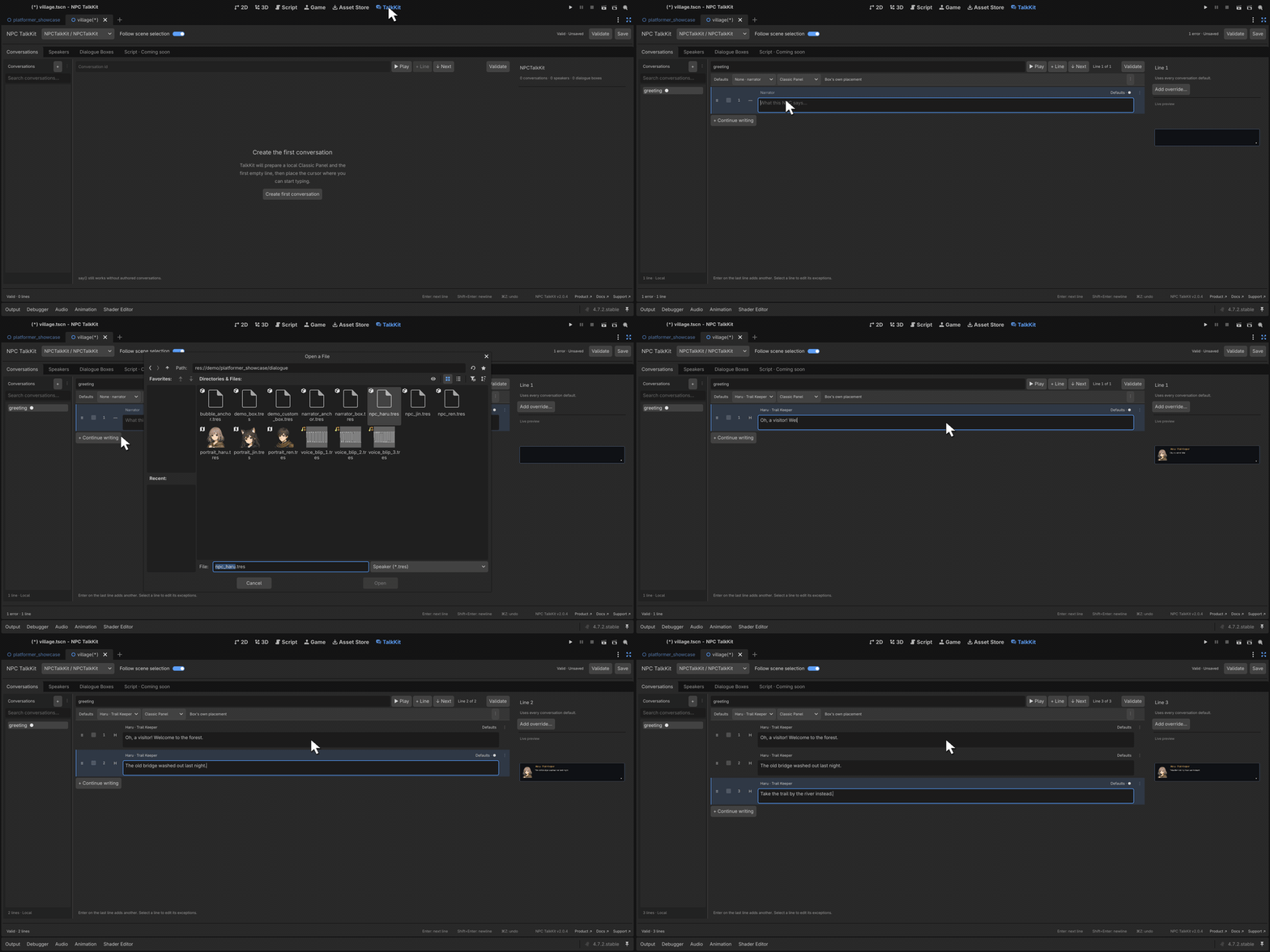
Select the node and press Open Editor in its Inspector, or open the TalkKit main screen at the top of Godot. In Conversations, press +, name the conversation greeting, and type. Enter moves to the next line; on the last line it creates another.
The preview on the right shows the line in the real box as you type. ▶ Play runs the whole conversation there.
No files are created. The conversation lives in the scene, like an AnimationPlayer's animations.
3. Let the player start it
Add a TalkInteractionArea2D as another child of the NPC (use TalkInteractionArea3D in a 3D game), and give it a CollisionShape2D the size of the talking range. In its Inspector:
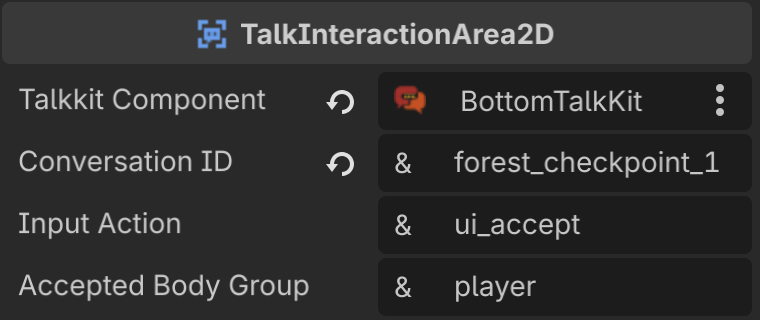
| Field | Set to |
|---|---|
| Talkkit Component | the NPCTalkKit node |
| Conversation ID | greeting |
| Accepted Body Group | the group your player is in, player by default |
| Input Action | the key that talks, ui_accept by default |
Run the game, walk up to the NPC and press the key. The same key moves to the next line.
Blacksmith (CharacterBody2D)
├── Sprite2D
├── CollisionShape2D
├── NPCTalkKit
└── TalkInteractionArea2D
    └── CollisionShape2D
Already have a "press E to interact" system?
Skip the area and start the conversation from your own code with one line, $NPCTalkKit.play(&"greeting"). See Use your own interaction system.
Done: your NPC can now talk
That is the whole setup. Everything below is for when you want to change something.
The three things TalkKit knows about
Each of these is independent, so changing one never forces a change in another.
| Decides | Where you set it | |
|---|---|---|
| Conversation | what is said | Conversations tab |
| Dialogue Box | what the box is and how it looks | Dialogue Boxes tab, see Dialogue box |
| Placement | where it sits, what it tracks | the conversation's Defaults row, see Placement |
A Classic Panel can follow an NPC's head. A Speech Bubble can pin to a screen corner. Picking a box does not pick a position.
Script view: coming soon
The Script · Coming soon tab is a preview of a future text-first workflow. It is not an editable source format yet; the visual workspace and resources remain the source of truth.
Optional: lock player movement during dialogue
TalkKit never touches your player controller, so by itself the player can walk away mid-sentence. When a conversation starts it emits request_player_lock, and your player script can answer by stopping movement. That is a few lines, shown in Add dialogue to an existing NPC.
What TalkKit does not do
It does not own quests, inventory, saves, player control, NPC AI, or branching logic. Your game already has those, and TalkKit is built to leave them alone.
For player choice, see Events and branching: playback pauses and your own GDScript decides what happens next.
Next
- Writing conversations: names in lines, per-line options
- Dialogue box: templates, customizing, saving
- Events and branching: choices without a branching engine
- API reference: one page, everything public