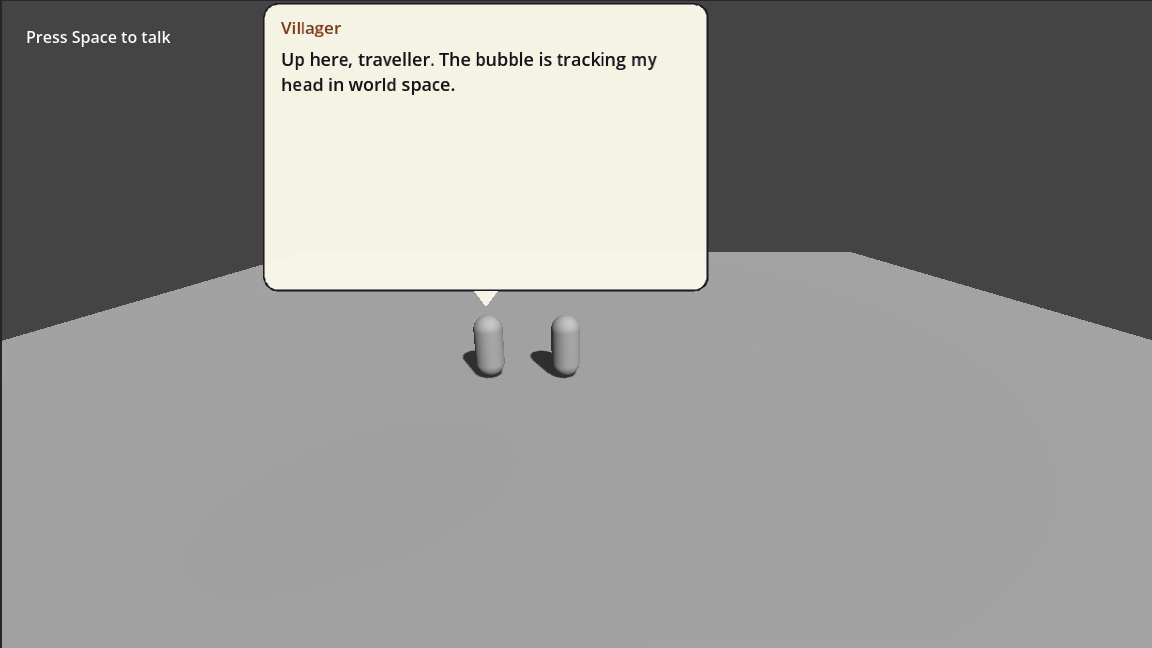
NPC dialogue in 3D
A dialogue box over a 3D character is a 2D box positioned from a 3D point. That projection is where things go wrong, so each trap is handled explicitly.
Set it up
- Add an NPCTalkKit to your
Node3DorCharacterBody3D. - In the TalkKit workspace, add a box with Dialogue Boxes → + New → Speech Bubble, then set the conversation's Dialogue Box default to
Speech Bubble. - Set its placement to Follow target, or build one in code:
extends Node

## Docs: /guide/anchoring — where the box sits and what it tracks.

var _camera: Camera3D
var _villager: Node3D


func _ready() -> void:
	_build()


#region screen
# Pinned to the viewport. The Classic Panel ships with this, but any box can
# use it — placement is not decided by the template you picked.
func pin_to_the_bottom() -> void:
	var anchor := TalkAnchor.new()
	anchor.mode = TalkAnchor.Mode.SCREEN
	anchor.screen_spot = TalkAnchor.Spot.BOTTOM
	anchor.screen_margin = Vector2(32.0, 32.0)
	anchor.stretch_horizontal = true
	$NPCTalkKit.quick_say_placement = anchor
#endregion


#region follow-2d
# Tracks a node. `pivot` says which part of the box lands on the target:
# (0.5, 1) puts it above, (0.5, 0) below, (1, 0.5) to its left.
func float_above_the_npc(npc: Node2D) -> void:
	var anchor := TalkAnchor.new()
	anchor.mode = TalkAnchor.Mode.NODE_FOLLOW
	anchor.follow_offset = Vector2(0.0, -96.0)
	anchor.pivot = Vector2(0.5, 1.0)
	anchor.when_offscreen = TalkAnchor.Offscreen.CLAMP
	$NPCTalkKit.quick_say_placement = anchor
	$NPCTalkKit.conversation_target = npc
#endregion


#region follow-3d
# Two offsets, and the difference matters. follow_offset_3d is world space and
# is applied before projection, so it stays on the character's head as the
# camera moves. follow_offset is a screen-space nudge applied afterwards.
func float_above_a_3d_character(character: Node3D) -> void:
	var anchor := TalkAnchor.new()
	anchor.mode = TalkAnchor.Mode.NODE_FOLLOW
	anchor.follow_offset_3d = Vector3(0.0, 1.9, 0.0)   # head height, in metres
	anchor.follow_offset = Vector2(0.0, -12.0)         # a few pixels of air
	anchor.max_distance = 30.0                         # hide beyond this
	anchor.when_offscreen = TalkAnchor.Offscreen.HIDE
	$NPCTalkKit.quick_say_placement = anchor
	$NPCTalkKit.conversation_target = character
#endregion


#region distance
# Off by default: a constant on-screen size keeps text readable at any range.
# Turn it on when the box should feel part of the world.
func shrink_with_distance(anchor: TalkAnchor) -> void:
	anchor.scale_with_distance = true
	anchor.reference_distance = 8.0
	anchor.min_scale = 0.6
	anchor.max_scale = 1.4
#endregion


func _build() -> void:
	var box := _instant_box()
	var talk := NPCTalkKit.new()
	talk.name = "NPCTalkKit"
	talk.dialogue_boxes = [box]
	add_child(talk)

	_camera = Camera3D.new()
	_camera.position = Vector3(0.0, 0.0, 10.0)
	add_child(_camera)
	_camera.make_current()

	_villager = Node3D.new()
	add_child(_villager)


func _verify() -> Array[String]:
	var failures: Array[String] = []
	var box := Vector2(400.0, 100.0)
	var talk: NPCTalkKit = $NPCTalkKit

	pin_to_the_bottom()
	var screen := talk.quick_say_placement.resolve(self, box)
	var view := get_viewport().get_visible_rect().size
	if not screen.visible or not is_equal_approx(screen.position.y, view.y - 100.0 - 32.0):
		failures.append("anchoring: the screen anchor did not sit on the bottom margin")

	float_above_a_3d_character(_villager)
	var tracked := talk.quick_say_placement.resolve(self, box, _villager)
	if not tracked.visible:
		failures.append("anchoring: a character in front of the camera must be visible")

	# Behind the camera must hide, not mirror across the screen.
	_villager.position = Vector3(0.0, 0.0, 40.0)
	if talk.quick_say_placement.resolve(self, box, _villager).visible:
		failures.append("anchoring: a target behind the camera must be hidden")
	_villager.position = Vector3.ZERO

	# Past max_distance must hide.
	_camera.position = Vector3(0.0, 0.0, 100.0)
	if talk.quick_say_placement.resolve(self, box, _villager).visible:
		failures.append("anchoring: max_distance did not hide the box")
	_camera.position = Vector3(0.0, 0.0, 10.0)

	shrink_with_distance(talk.quick_say_placement)
	var scaled := talk.quick_say_placement.resolve(self, box, _villager)
	if is_equal_approx(scaled.scale, 1.0):
		failures.append("anchoring: distance scaling had no effect")
	return failures


## Typing speed lives on the dialogue box now, so turning it off for a scripted
## run means handing the node a box that types instantly.
func _instant_box() -> TalkBoxTemplate:
	var template := TalkBoxTemplate.new()
	template.typewriter_speed = 0.0
	return template
That is the whole setup. The box stays on a CanvasLayer, so text does not scale with camera zoom — it is UI, not geometry.
The offset that actually matters
There are two, and picking the wrong one is the most common mistake:
| Space | Applied | Use for | |
|---|---|---|---|
follow_offset_3d | world, metres | before projection | head height |
follow_offset | screen, pixels | after projection | a few pixels of air |
Use only follow_offset and the bubble sits correctly from one camera angle, then drifts off the head as the player walks closer. Use follow_offset_3d and it stays glued to the character at every distance, shrinking on screen the way anything else in the world does.
Vector3(0, 1.9, 0) is about right for a human-sized character whose origin is at the feet.
Behind the camera
Camera3D.unproject_position() mirrors points behind the camera, which would throw the bubble to the opposite side of the screen. TalkKit checks is_position_behind() and hides instead. You do not have to do anything — but if you write your own anchor by subclassing TalkAnchor, remember it.
Distance
anchor.max_distance = 30.0Beyond that, the box hides. Without it, a distant NPC's dialogue keeps drawing at full size over whatever is in front of them.
By default the box keeps a constant on-screen size, because readable text matters more than perspective. If you want it to feel more physically present:
extends Node

## Docs: /guide/anchoring — where the box sits and what it tracks.

var _camera: Camera3D
var _villager: Node3D


func _ready() -> void:
	_build()


#region screen
# Pinned to the viewport. The Classic Panel ships with this, but any box can
# use it — placement is not decided by the template you picked.
func pin_to_the_bottom() -> void:
	var anchor := TalkAnchor.new()
	anchor.mode = TalkAnchor.Mode.SCREEN
	anchor.screen_spot = TalkAnchor.Spot.BOTTOM
	anchor.screen_margin = Vector2(32.0, 32.0)
	anchor.stretch_horizontal = true
	$NPCTalkKit.quick_say_placement = anchor
#endregion


#region follow-2d
# Tracks a node. `pivot` says which part of the box lands on the target:
# (0.5, 1) puts it above, (0.5, 0) below, (1, 0.5) to its left.
func float_above_the_npc(npc: Node2D) -> void:
	var anchor := TalkAnchor.new()
	anchor.mode = TalkAnchor.Mode.NODE_FOLLOW
	anchor.follow_offset = Vector2(0.0, -96.0)
	anchor.pivot = Vector2(0.5, 1.0)
	anchor.when_offscreen = TalkAnchor.Offscreen.CLAMP
	$NPCTalkKit.quick_say_placement = anchor
	$NPCTalkKit.conversation_target = npc
#endregion


#region follow-3d
# Two offsets, and the difference matters. follow_offset_3d is world space and
# is applied before projection, so it stays on the character's head as the
# camera moves. follow_offset is a screen-space nudge applied afterwards.
func float_above_a_3d_character(character: Node3D) -> void:
	var anchor := TalkAnchor.new()
	anchor.mode = TalkAnchor.Mode.NODE_FOLLOW
	anchor.follow_offset_3d = Vector3(0.0, 1.9, 0.0)   # head height, in metres
	anchor.follow_offset = Vector2(0.0, -12.0)         # a few pixels of air
	anchor.max_distance = 30.0                         # hide beyond this
	anchor.when_offscreen = TalkAnchor.Offscreen.HIDE
	$NPCTalkKit.quick_say_placement = anchor
	$NPCTalkKit.conversation_target = character
#endregion


#region distance
# Off by default: a constant on-screen size keeps text readable at any range.
# Turn it on when the box should feel part of the world.
func shrink_with_distance(anchor: TalkAnchor) -> void:
	anchor.scale_with_distance = true
	anchor.reference_distance = 8.0
	anchor.min_scale = 0.6
	anchor.max_scale = 1.4
#endregion


func _build() -> void:
	var box := _instant_box()
	var talk := NPCTalkKit.new()
	talk.name = "NPCTalkKit"
	talk.dialogue_boxes = [box]
	add_child(talk)

	_camera = Camera3D.new()
	_camera.position = Vector3(0.0, 0.0, 10.0)
	add_child(_camera)
	_camera.make_current()

	_villager = Node3D.new()
	add_child(_villager)


func _verify() -> Array[String]:
	var failures: Array[String] = []
	var box := Vector2(400.0, 100.0)
	var talk: NPCTalkKit = $NPCTalkKit

	pin_to_the_bottom()
	var screen := talk.quick_say_placement.resolve(self, box)
	var view := get_viewport().get_visible_rect().size
	if not screen.visible or not is_equal_approx(screen.position.y, view.y - 100.0 - 32.0):
		failures.append("anchoring: the screen anchor did not sit on the bottom margin")

	float_above_a_3d_character(_villager)
	var tracked := talk.quick_say_placement.resolve(self, box, _villager)
	if not tracked.visible:
		failures.append("anchoring: a character in front of the camera must be visible")

	# Behind the camera must hide, not mirror across the screen.
	_villager.position = Vector3(0.0, 0.0, 40.0)
	if talk.quick_say_placement.resolve(self, box, _villager).visible:
		failures.append("anchoring: a target behind the camera must be hidden")
	_villager.position = Vector3.ZERO

	# Past max_distance must hide.
	_camera.position = Vector3(0.0, 0.0, 100.0)
	if talk.quick_say_placement.resolve(self, box, _villager).visible:
		failures.append("anchoring: max_distance did not hide the box")
	_camera.position = Vector3(0.0, 0.0, 10.0)

	shrink_with_distance(talk.quick_say_placement)
	var scaled := talk.quick_say_placement.resolve(self, box, _villager)
	if is_equal_approx(scaled.scale, 1.0):
		failures.append("anchoring: distance scaling had no effect")
	return failures


## Typing speed lives on the dialogue box now, so turning it off for a scripted
## run means handing the node a box that types instantly.
func _instant_box() -> TalkBoxTemplate:
	var template := TalkBoxTemplate.new()
	template.typewriter_speed = 0.0
	return template
The clamps stop it becoming unreadable up close or at range.
Characters behind walls
anchor.hide_when_occluded = true
anchor.occlusion_mask = 1
This raycasts from the camera to the anchor point each physics frame. It is off by default because it is the only per-frame cost in the anchor — turn it on where it matters, like a crowded interior, rather than everywhere.
Triggering it
TalkInteractionArea3D mirrors the 2D helper: add it to the character with a collision shape, point it at the NPCTalkKit, and it plays on ui_accept when a body in the player group is inside.
Already have an interaction system? Call play() from it and skip the helper — that is the preferred route.
See it running
demo/showcase_3d/showcase_3d.tscn is built entirely from Godot primitives, so it carries no imported art. Walk up to the villager and press Space.